v4 ft: Allows custom tab placement inside tabs content #15461
Closed
Conversation
This file contains hidden or bidirectional Unicode text that may be interpreted or compiled differently than what appears below. To review, open the file in an editor that reveals hidden Unicode characters.
Learn more about bidirectional Unicode characters


Screenshot Report 🔎📱
No comparison data found! 💙 - Ionitron |
6 similar comments
Screenshot Report 🔎📱
No comparison data found! 💙 - Ionitron |
Screenshot Report 🔎📱
No comparison data found! 💙 - Ionitron |
Screenshot Report 🔎📱
No comparison data found! 💙 - Ionitron |
Screenshot Report 🔎📱
No comparison data found! 💙 - Ionitron |
Screenshot Report 🔎📱
No comparison data found! 💙 - Ionitron |
Screenshot Report 🔎📱
No comparison data found! 💙 - Ionitron |

Member
|
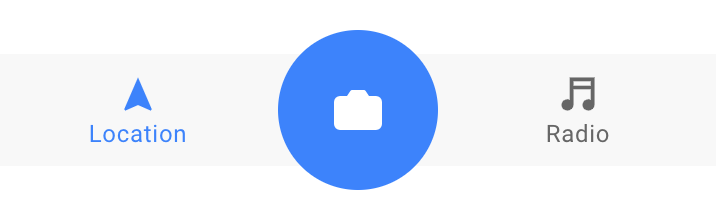
Thank you for the PR! With the recent changes to tabs in 4.0.0-beta.15 you should have full control over customizing the <ion-tab-bar selected-tab="1" class="custom-tabbar">
<ion-tab-button tab="1">
<ion-label>Location</ion-label>
<ion-icon name="navigate"></ion-icon>
</ion-tab-button>
<ion-tab-button tab="2" class="main-tab">
<ion-icon src="/src/components/tab-bar/test/scenarios/camera.svg"></ion-icon>
</ion-tab-button>
<ion-tab-button tab="3">
<ion-label>Radio</ion-label>
<ion-icon name="musical-notes"></ion-icon>
</ion-tab-button>
</ion-tab-bar>.custom-tabbar {
margin-top: 30px;
margin-bottom: 30px;
overflow: visible;
contain: none;
}
.main-tab {
border-radius: 50%;
max-width: 80px;
height: 80px;
background: #3880ff;
color: white;
font-size: 16px;
}
I am going to close this PR since it should now be possible to customize ours and achieve the desired behavior. However, please let me know if I am misunderstanding you so we can find a solution. Thanks! 🙂 |


Sign up for free
to join this conversation on GitHub.
Already have an account?
Sign in to comment
2 participants


Add this suggestion to a batch that can be applied as a single commit.
This suggestion is invalid because no changes were made to the code.
Suggestions cannot be applied while the pull request is closed.
Suggestions cannot be applied while viewing a subset of changes.
Only one suggestion per line can be applied in a batch.
Add this suggestion to a batch that can be applied as a single commit.
Applying suggestions on deleted lines is not supported.
You must change the existing code in this line in order to create a valid suggestion.
Outdated suggestions cannot be applied.
This suggestion has been applied or marked resolved.
Suggestions cannot be applied from pending reviews.
Suggestions cannot be applied on multi-line comments.
Suggestions cannot be applied while the pull request is queued to merge.
Suggestion cannot be applied right now. Please check back later.
Short description of what this resolves:
This allows you to place custom tabbar implementations inside the shadowDOM to allow the bar to place correctly and fill the container space accurately.
Changes proposed in this pull request:
tabbarslot to theion-tabsweb componentIonic Version: 4
Notice how in the before gif I cannot reach the end of the container because it does not account for my tabbar. In the after, the content is projected in the same slot and calculates against the sizing of the bar.
Before:
After: